Quickstart
Create a workspace, connect a runner, and trigger your first workflow on Duraton.
You'll write a workflow that charges an order, waits, then ships it, and watch it run on Duraton - surviving retries and a runner restart without ever charging twice.
Duraton is in beta. The SDK below resolves to the current beta; pin it explicitly with
bun add @duraton/sdk@next. A stable v0.1.0 will take over the default later.
1. Create your workspace
Sign up at app.duraton.dev. A workspace is created for you, and the Overview walks you through the three steps below. You can add more workspaces - and invite members - later.
2. Issue an API key
In the console, open API Keys and issue a secret key. A secret key is read + write - your runner connects and reports results with it. It's shown once, so copy it now.
Set it in your runner's environment, along with your Duraton URL (both are shown in the console):
export DURATON_API_KEY="dtn_live_..."
export DURATON_ENGINE_URL="https://run.duraton.dev"
3. Write a workflow
Add the SDK (this example uses Bun to run the workflow file):
bun add @duraton/sdkA workflow is a function triggered by an event. Wrap each unit of work in a step so it runs once and its result is remembered.
import { defineWorkflow } from "@duraton/sdk";

interface OrderData {
  orderId: string;
}

const orderCreated = defineWorkflow<OrderData>({
  name: "order.created",
  retry: { maxAttempts: 3 },
  handler: async (ctx) => {
    const { orderId } = ctx.event.data;

    const charge = await ctx.step.run("charge", () => ({
      chargeId: `ch_${orderId}`,
      amount: 4200,
    }));

    await ctx.step.sleep("settle", "10s");

    const ship = await ctx.step.run("ship", () => ({
      tracking: `trk_${orderId}`,
    }));

    return { orderId, charge, ship };
  },
});
Now run it. The simplest way is connect() - the runner dials Duraton over a WebSocket, so there's
no port to expose, no framework, and no separate registration. It reads DURATON_ENGINE_URL and
DURATON_API_KEY from the environment you set above:
import { connect } from "@duraton/sdk";

connect({ app: "order-app", workflows: [orderCreated] });
bun run runner.tsThat's the whole runner. Open Apps in the console and you'll see it connected.
Prefer HTTP? Mount it in your framework
If you already run an HTTP server, or you deploy to serverless, serve the runner over HTTP instead.
Import the adapter for your framework - each one both serves your workflows and registers them (passing
app turns on registration; Duraton URL comes from DURATON_ENGINE_URL). Set url to the public
address Duraton can reach; the route defaults to /invoke.
Bun and Next.js need only the SDK. The others also need their framework: bun add hono, elysia,
express, or fastify.
import { serve } from "@duraton/sdk/bun";

Bun.serve({ port: 6773, routes: { "/invoke": serve({ app: "order-app", url: "https://your-runner.example.com/invoke", workflows: [orderCreated] }) } });import { serve } from "@duraton/sdk/hono";
import { Hono } from "hono";
const app = new Hono();
app.post("/invoke", serve({ app: "order-app", url: "https://your-runner.example.com/invoke", workflows: [orderCreated] }));
Bun.serve({ port: 6773, fetch: app.fetch });import { serve } from "@duraton/sdk/elysia";
import { Elysia } from "elysia";
new Elysia().post("/invoke", serve({ app: "order-app", url: "https://your-runner.example.com/invoke", workflows: [orderCreated] })).listen(6773);import { serve } from "@duraton/sdk/express";
import express from "express";
const app = express();
app.post("/invoke", serve({ app: "order-app", url: "https://your-runner.example.com/invoke", workflows: [orderCreated] }));
app.listen(6773);import { serve } from "@duraton/sdk/fastify";
import Fastify from "fastify";
const app = Fastify();
app.register(serve({ app: "order-app", url: "https://your-runner.example.com/invoke", workflows: [orderCreated] }));
app.listen({ port: 6773 });import { serve } from "@duraton/sdk/next";
import { orderCreated } from "../../../workflows";
export const { POST } = serve({
app: "order-app",
url: "https://your-app.example.com/api/duraton",
workflows: [orderCreated],
});import { toNodeHandler } from "@duraton/sdk/node";
import { createServer } from "node:http";
createServer(toNodeHandler({ app: "order-app", url: "https://your-runner.example.com/invoke", workflows: [orderCreated] })).listen(6773);A serve-mode runner must be reachable at its url so Duraton can POST invokes to it; connect()
avoids that by dialing out instead.
4. Trigger it
Send the event the workflow listens for - with the SDK client, or over the REST API authenticated with your key:
import { createClient } from "@duraton/sdk";

const duraton = createClient({
  engineUrl: process.env.DURATON_ENGINE_URL!,
  apiKey: process.env.DURATON_API_KEY,
});

await duraton.events.send({
  name: "order.created",
  app: "order-app",
  data: { orderId: "A1" },
});
curl -X POST "$DURATON_ENGINE_URL/events" \
-H "Authorization: Bearer $DURATON_API_KEY" \
-d '{"name":"order.created","app":"order-app","data":{"orderId":"A1"}}'5. Watch it run
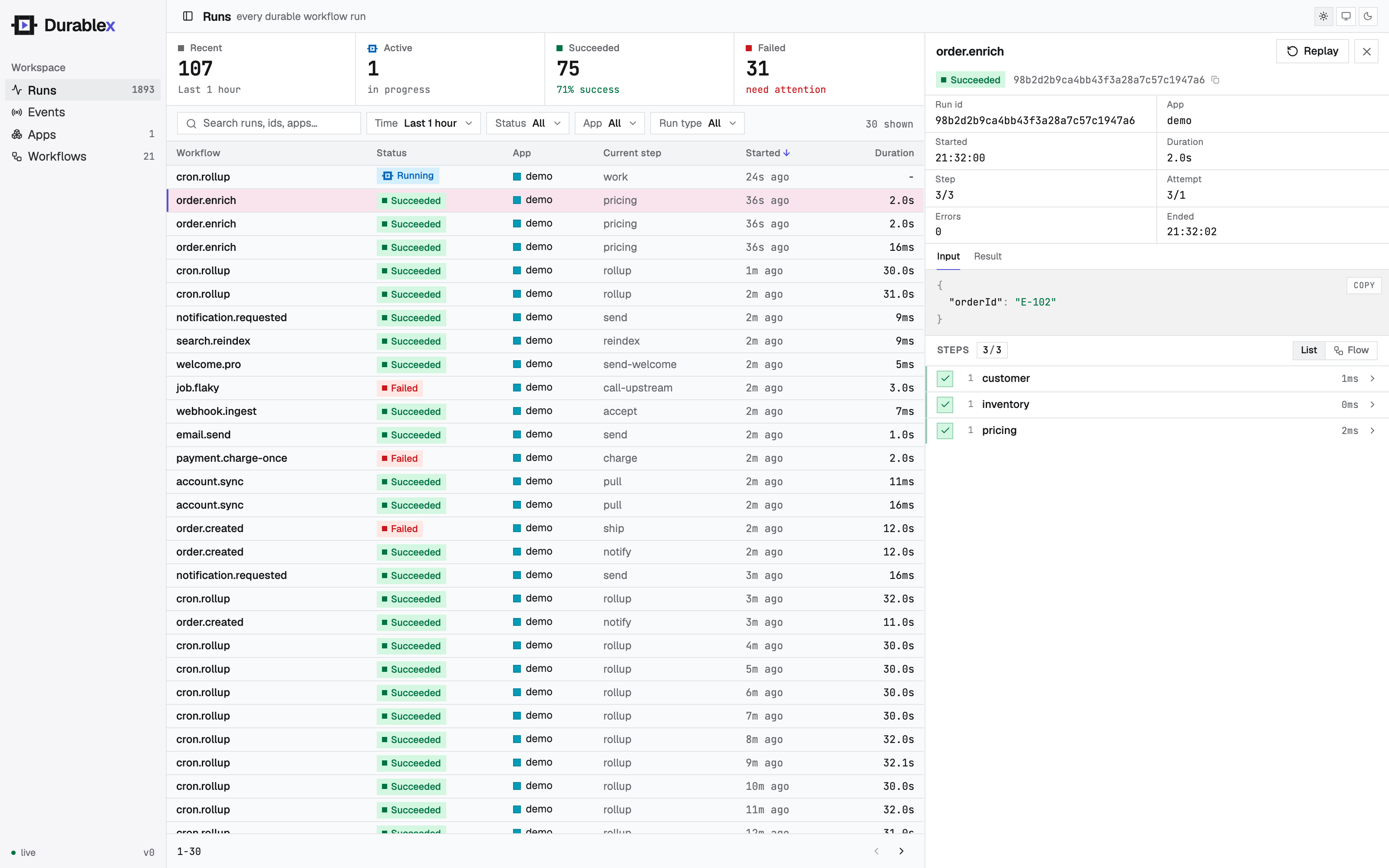
Open Runs in the console. charge completes, the run waits out the sleep, then ship completes
and the run succeeds - streaming in live as it executes.
6. See durable execution
While the run is sleeping, stop your runner (Ctrl-C) and start it again with bun run runner.ts. Duraton
holds the run, then re-invokes when your runner reconnects - and charge does not run a
second time, because its result was saved on the first pass. That's durable execution: your code
survives restarts without losing progress or repeating work.